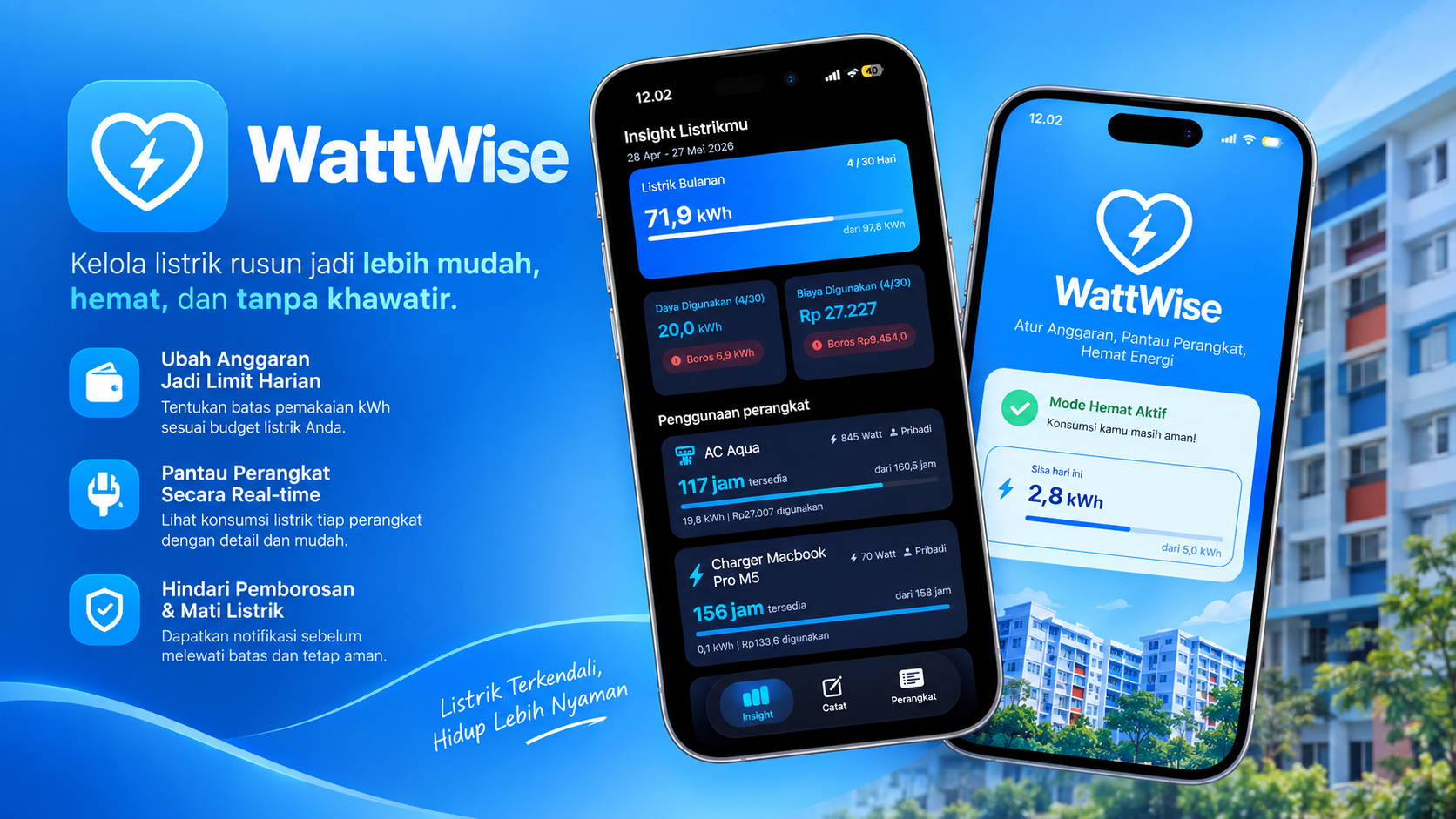
The Dorm Room Friction
When I moved to Batam to join the Apple Developer Academy, I moved into a student flat (rusunawa) and shared a room with a friend. It did not take long for our daily routines to clash over electricity. I was constantly mindful of our power consumption, flipping switches off to make sure our prepaid PLN token would last the month. My roommate, on the other hand, had a much more relaxed attitude toward leaving appliances plugged in and powered on.
Within two weeks, the prepaid meter was beeping outside our door, and our balance was wiped out.
When I talked to other Academy learners living across the rusun, I realized we were not alone. Almost every shared room had the exact same headache: learners chipping in for a token, watching it drain way faster than expected, and having awkward conversations about whose laptop charger or rice cooker was draining the units.
That shared dorm frustration sparked WattWise (internally codenamed A-Buddy) during Challenge 2. My team and I set out to build an iOS tool that translates abstract monthly electricity balances into practical daily limits.
Monthly PLN Prepaid Budget (IDR / kWh)
                  │
                  ▼
       The Cognitive Barrier
   ("Rp 150,000 left on day 12" doesn't
    tell anyone what to do on Tuesday)
                  │
                  ▼
   Deconstructed Daily Allocation
   (Monthly Budget ÷ Days in Month)
                  │
                  ▼
   Appliance Registration (AddDeviceView)
   ├── Rice Cooker (400W × 4 hrs = 1.6 kWh)
   ├── Iron (1000W × 0.5 hrs = 0.5 kWh)
   └── Fan (50W × 8 hrs = 0.4 kWh)
                  │
                  ▼
    Live Daily Balance (ContentView)
   (Real-time headroom indicator before flipping a switch)
The Abstract Metric Trap
When we started researching utility habits across the rusun, our first instinct as developers was to build an all-in-one technical analytics screen:
- A prominent circular gauge showing remaining monthly kilowatt-hours (kWh).
- Multi-tier tariff rate calculators for PLN R1 450VA and 900VA connections.
- Line charts showing weekly consumption trajectories.
During user interviews with fellow Academy learners and rusun residents, that design fell apart within minutes.
Learners did not think in kilowatt-hours. When an interviewee looked at our mockup showing “34.2 kWh remaining for the billing cycle,” they had no idea whether that meant they could iron three shirts or boil soup. A single aggregate monthly number gave users zero actionable guidance on a Tuesday morning. The meter still went empty ten days early because the data did not connect to immediate decisions.
What if instead of displaying abstract electrical units, we translated the budget into daily runtime minutes for each appliance?
Translating Budgets into Daily Appliance Allocations
To bridge this gap, we removed the technical math from the primary user flow.
WattWise shifts the paradigm from retroactive billing to proactive daily budgeting:
- The user inputs their monthly prepaid budget in Indonesian Rupiah.
- The app converts the currency into an allowable kilowatt-hour ceiling based on their PLN tariff tier and divides it by the days in the month to establish a sustainable daily quota.
- In
AddDeviceView.swift, flatmates register the appliances they share, entering the wattage listed on the manufacturer label and their estimated daily runtime.
struct ApplianceUsage: Identifiable {
    let id = UUID()
    let name: String
    let wattage: Double      // in Watts
    let dailyHours: Double   // estimated hours per day

    // Daily consumption calculation in kWh
    var dailyKWh: Double {
        return (wattage / 1000.0) * dailyHours
    }
}

final class BudgetViewModel: ObservableObject {
    @Published var appliances: [ApplianceUsage] = []
    @Published var dailyKWhAllowance: Double = 5.2

    var totalDailyKWhUsed: Double {
        appliances.reduce(0) { $0 + $1.dailyKWh }
    }

    var remainingDailyKWh: Double {
        dailyKWhAllowance - totalDailyKWhUsed
    }

    var isOverBudget: Bool {
        remainingDailyKWh < 0
    }
}
The app computes (wattage / 1000.0) * hours for every device in the background.
In the main interface (ContentView.swift), users see a straightforward balance bar: if you run the rice cooker and the fan as planned, you still have enough power headroom to run the iron for twenty minutes without endangering the end-of-month token.
Lightweight On-Device Architecture
Because WattWise targets everyday utility tracking in communal settings, we kept the architecture lightweight and completely offline:
A-Buddy/
├── A_BuddyApp.swift       // Application lifecycle entry point
├── ContentView.swift      // Primary daily allowance status view
├── AddDeviceView.swift    // Rapid 3-tap appliance registration sheet
├── StickyView.swift       // Persistent visual allocation card for quick checks
└── Assets.xcassets/       // High-contrast accessibility iconography
We used declarative SwiftUI views bound to an observable BudgetViewModel. Everything persists locally on the device, eliminating network round-trips and authentication friction.
To help flatmates quickly reference their limits before turning on high-draw equipment, we designed StickyView.swift, a compact summary card that stays glanceable on the counter iPad or iPhone.
What I Learned
WattWise was developed during Challenge 2 at Apple Developer Academy, a sprint centered on Apple’s Human-Centered Design (HCD) methodology.
The project began with a very personal friction in our Batam rusun room, but turning it into a real product taught me that user empathy often requires taking engineering complexity out of the interface. As programmers, our natural reflex is to expose all raw telemetry: voltage, amperage, tariff multipliers, and statistical graphs. But for roommates sharing a flat, that information only created confusion and awkward tension.
Hiding the kilowatt-hour calculations behind a clean daily quota answered the one question roommates actually had: “Can I turn this on right now without running out of power next week?” Building software that respects human habits is just as important as writing clean Swift code.