The Backstory
When I moved to Batam to join the Apple Developer Academy, living hundreds of kilometers away from my parents made something clear: staying genuinely informed about their well-being is surprisingly difficult.
Whenever I call home and ask how they are feeling, the answer is almost always the same: “We are fine, everything is normal, don’t worry about us.”
Older parents rarely talk about minor physical changes. A few consecutive nights of broken sleep, skipping their usual morning walk because of fatigue, or an elevated resting heart rate do not feel serious enough to bring up in a quick catch-up call. By the time a child realizes something is wrong, a minor discomfort has often grown into a hospital visit.
Yet the alternative feels just as bad. Parents hate invasive home cameras or medical gadgets that make them feel like patients under surveillance. And adult children do not want to turn into micromanaging interrogators.
Why I Built Arterious
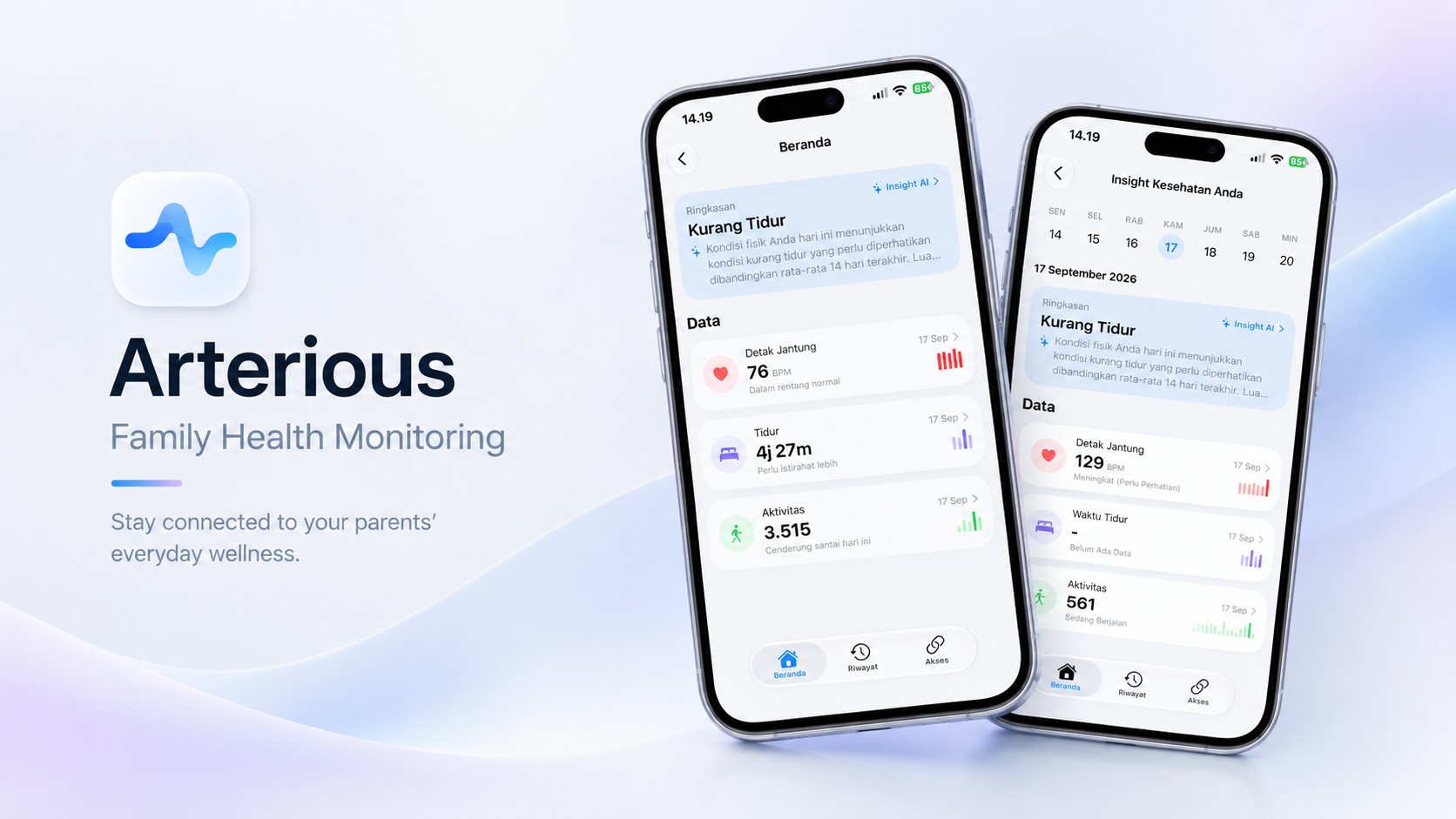
I built Arterious during Challenge 5 at the Apple Developer Academy to address that gap. The goal was straightforward: use passive biometric telemetry from Apple HealthKit to track parental wellness baselines, and translate those trends into gentle conversation starters rather than stressful clinical alarms.
Instead of treating parents like patients, the app gives adult children just enough context to start a caring conversation.
Medical Disclaimer: Arterious is designed strictly for general health awareness and family connection. It does not measure blood pressure, diagnose medical conditions, or replace professional healthcare advice.
Understanding the Distance Gap
During our user research phase, I interviewed adult children living away from home as well as elderly parents living independently. Two consistent patterns emerged:
First, adult children carry a quiet worry about subtle health declines in their parents. But asking direct medical questions feels clinical and creates friction, so children end up guessing.
Second, parents deeply value their autonomy. They refuse to fill out daily symptom checklists or wear bulky medical devices that disrupt their daily routine.
This shaped my core design requirement: the app had to run entirely on passive background data. Parents should never need to type a single number or log a symptom. The child should receive enough context to know when to ask a caring question, without the app ever making alarming diagnostic claims.
System Architecture
I designed Arterious around two native views (one for the parent and one for the child) connected through Apple’s ecosystem technologies:
Parent Apple Watch & iPhone
        ↓
  Apple HealthKit (Biometrics)
        ↓
  Multi-Metric Rule Engine (Local)
        ↓
  CloudKit Private Database
        ↓
  Google Gemini LLM (Structured JSON Insights)
        ↓
Child Dashboard & Gentle Conversation Starters
1. HealthKit Telemetry Pipeline
Rather than asking parents to log their vitals, I set up HealthKitManager to read background biometric samples directly from Apple Watch and iPhone sensors:
- Resting heart rate to monitor multi-day baseline shifts
- Heart rate variability (SDNN) as an indicator of autonomic recovery and stress
- Sleep analysis tracking both total hours and sleep continuity
- Step counts and active energy expenditure to follow daily mobility habits
Because individual sensor readings fluctuate throughout the day, I built queries that aggregate samples into a rolling 7-day average. This gave me a stable personal baseline to evaluate changes against, rather than reacting to single-day spikes.
2. Multi-Metric Rule Engine
One restless night or an isolated bump in heart rate does not mean someone is unwell. Firing notifications on every single spike would quickly cause alert fatigue.
To handle this, I created a local RuleEngine that evaluates biometrics in combination:
- If resting heart rate rises more than 15% above the 7-day baseline alongside a significant drop in sleep duration across consecutive nights, the engine marks a sustained rest deficit.
- If step counts drop sharply while resting heart rate stays steady, the engine treats it as a routine schedule change rather than physical strain.
This multi-metric check filters out daily noise before sending any summary to the child.
3. Gemini LLM Structured Summaries
Raw health charts confuse non-technical users. Showing an adult child fluctuating graphs of heart rate variability in milliseconds often creates unnecessary worry because they do not know how to interpret the numbers.
To turn these numbers into practical insights without making medical claims, I integrated Google Gemini via GeminiService using strict JSON schemas:
{
  "wellnessStatus": "Needs Attention",
  "summary": "Resting heart rate has trended slightly above baseline over the past three days, coinciding with shorter sleep cycles.",
  "conversationStarters": [
    "Ask dad how his morning walk went today.",
    "Check in gently to see if he was able to take an afternoon nap."
  ],
  "disclaimer": "This summary is based on general fitness trends and is not a medical evaluation."
}
I enforced defensive prompt boundaries:
- The model cannot output diagnostic terminology, cardiovascular disease labels, or clinical classifications.
- It never suggests altering medication or treatment plans.
- Output text must focus on practical, caring conversation starters that encourage warm family calls.
4. CloudKit Family Sync
Biometric data is private. Storing personal health records on a third-party server introduces serious privacy and maintenance concerns.
I implemented CloudKitSyncManager to handle data exchange using Apple’s CloudKit Private Database:
- Parental biometric records stay within the user’s private iCloud storage.
- Synchronization between the parent’s device and the child’s device uses Apple’s native encrypted sharing framework.
- No custom backend server ever sees or stores the raw health metrics.
Technical Challenges
Swift 6 Concurrency & Actor Isolation
HealthKit queries run asynchronously and return samples across background threads. Under Swift 6 strict concurrency checks, managing sample buffers and updating SwiftUI state required clean actor boundaries:
- Asynchronous HealthKit fetches run on background actors to prevent data races.
- View models use the
@Observablemacro and dispatch state mutations onto the@MainActorfor smooth UI rendering.
Guarding Against LLM Hallucinations
In any application that touches health data, hallucination is a safety hazard. If an LLM tells a child that their parent might have an arrhythmia, it causes immediate distress. I addressed this with three concrete constraints:
- I feed the model pre-aggregated statistical deltas (such as
baseline_rhr: 68, current_rhr: 76) instead of raw text prompts. - I enforce a strict JSON schema so the model cannot generate uncontrolled freeform advice.
- I wrote static fallback response templates in Swift that display safely if the network drops or the API response fails validation.
What I Learned
Building Arterious reinforced an important engineering lesson for me: in AI applications, the most critical work often happens outside the model. The real challenge was architecting privacy-first data pipelines with HealthKit and CloudKit, setting up reliable multi-metric filtering, and designing prompt guardrails that prevent the model from overstepping into clinical claims.
By keeping the focus on family communication rather than medical diagnosis, I was able to turn passive sensor numbers into meaningful check-ins between parents and children living far apart.